Automated tests tell you the code does what it was written to do. Device farms tell you it does that on a hundred hardware combinations. Neither tells you that seventy percent of people abandoned the signup because the verification email took four minutes and nothing on screen said it was coming.
That question needs a person with their own phone, on their own network, in the country where you are launching. This is how to buy that.
What real-user testing answers
Four classes of problem that no automated suite will surface.
Comprehension failures. People not understanding what a screen is asking, what a button does, or what happens next. The code is correct and the product is unusable.
Real-network behaviour. Timeouts, retries and half-loaded states on congested mobile networks in places your office wifi does not resemble.
Real-device diversity. Old hardware, low storage, aggressive battery management killing your background process, unusual screen ratios, an OEM keyboard that behaves differently. Device farms cover some of this; they do not cover a three-year-old phone with 4% storage free and eleven other apps competing for memory.
Regional reality. Payment methods that are unavailable, phone number formats that fail validation, address fields that assume a postcode, a translation that reads as nonsense to a native speaker. These are invisible from inside the team and obvious to somebody in the market.
If your question is "does this build pass", use automation. If it is "why is nobody converting", use people.
How a test round works
Define the flows, not the app
A round should test one or two specific paths — signup and first-run, or checkout, or the onboarding tutorial. "Try the app and tell us what you think" produces twenty-five unusable paragraphs.
Write the steps
Numbered, unambiguous, in the order you want them attempted. Include what to do if something fails, because otherwise each tester improvises and the reports stop being comparable.
Specify the proof
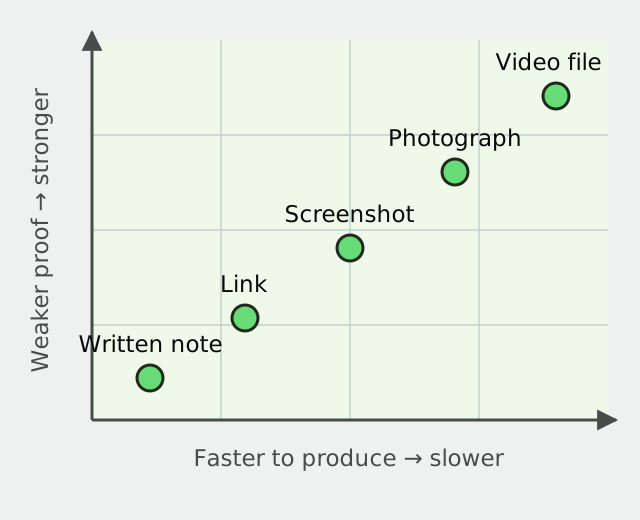
A screen recording, a written report against each step, screenshots at named points, or a combination. Ask for exactly what you will read.
Target eligibility
Country, language, and where it matters, the device or OS version. Eligibility is checked before someone reserves a spot, so a round targeting Android 12 on mid-range hardware does not come back full of iPhone reports.
Set the reward and spots
You choose the rate. Funding is calculated as reward multiplied by spots and committed before the brief publishes.
Review on a clock
Approve, request one correction, or reject. Unreviewed reports approve automatically after 48 hours.
What to pay
Rates depend mostly on how long a session takes and how narrow the requirement is.
| Session | Reward per tester |
|---|---|
| Short flow, written report, 10 minutes | $5 – $12 |
| Standard flow with screen recording, 20 minutes | $12 – $25 |
| Extended session, multiple flows, 40 minutes | $25 – $50 |
| Specific rare device or OS version | Add 50–100% |
| Narrow country or language requirement | Add 25–75% |
The premium on rare devices is not a surcharge for its own sake. Somebody who happens to own the exact handset your crash reports point at is scarce, and a brief that does not pay for that scarcity will not fill.
How many testers
Usability problems cluster heavily. The serious ones appear in the first handful of reports, and the rest of the round tells you whether a thing is systematic or one person's unusual setup. That distinction matters — a single report of a failure is a bug ticket, and eight reports of the same hesitation is a design problem.
Above thirty on a first round you are usually paying to confirm what the first ten already told you. Run small, fix, and run again against the same script. The second round measures whether the fix worked, which is the round that actually pays for itself.
Writing steps that produce comparable reports
The difference between useful and useless output is almost entirely here.
One action per step. "Sign up and complete your profile" is two steps and will be reported as one vague sentence.
Say what to record at each point. "Note the time between tapping Send and receiving the code" produces numbers. "Note if it was slow" produces adjectives.
Ask for the moment of hesitation. "At which point were you unsure what to do next?" is the single most valuable question on any test script and it is routinely omitted.
Cover the failure paths. What should they do if the code never arrives, the page does not load, the payment is declined? Without instruction, twenty-five people improvise twenty-five different things.
Ask for device and OS version explicitly. People forget, and a report without it cannot be reproduced.
Keep it under twenty minutes unless you are paying for more. Attention degrades and the last third of a long script gets skimmed.
Reading the results
Sort by frequency before severity. Eight reports mentioning the same confusion outrank one report of a dramatic crash, because the crash is a ticket and the confusion is costing you conversions on every install.
Separate three things as you read: outright defects, comprehension problems, and preferences. Defects go to engineering. Comprehension problems go to design. Preferences are noise unless several people independently share them, at which point they are data.
Getting coverage of the devices that matter
Device coverage is usually the reason a team buys this, and it is the part most easily got wrong.
Start from your own crash and analytics data, not from a market-share table. The handsets in your crash reports and the OS versions in your install base are the ones worth testing. A generic "test on Android" brief spends your budget on the phones that already work.
Ask testers to state device and OS version in every report, as a required field rather than a suggestion. A report you cannot attribute to hardware is a report you cannot act on.
Pay a premium for the awkward ones. Old handsets, low-storage devices, unusual OEM skins, and regional models that never shipped in your market. These are exactly the devices your users have and your team does not, and the people who own them are scarce enough to justify a higher reward.
Do not assume newer is better coverage. A brief that fills with people on current flagships tells you your app works in the best case, which you already knew.
Run the same script across two device tiers and compare. The difference between the two sets is frequently more informative than either set alone, because it isolates what is a design problem from what is a hardware constraint.
Testing in markets you are launching into
Regional testing catches a category of failure that is invisible from inside the team, and it is the case where real-user testing has no substitute at all.
Common findings: phone number validation rejecting a legitimate local format, address forms requiring a postcode where none exists, a payment method everyone uses being absent, a date format causing confusion, a translation that is grammatically fine and culturally wrong, and a verification SMS that never arrives on a particular carrier.
None of those appear in automated testing, because the code is correct. They appear when somebody in that country tries to use the thing.
Target eligibility by country and language, ask testers to complete the flow exactly as they would if it were their own money, and include a step asking whether anything felt unusual for their market. That last question surfaces more than the rest of the script combined.
Where the question is comprehension rather than defects, usability testing is the closer tool and the session design differs.
Against the alternatives
Automated testing. Different question. Keep it. It catches regressions cheaply and forever, and it will never tell you a label is confusing.
Device farms
Excellent for coverage across hardware and OS combinations at speed. They run your scripts; they do not have opinions, and they are not in Brazil on a 3G connection.
Real people on their own phones
Cheapest per report, fastest to a broad answer, and entirely dependent on the quality of your script. Recruiting runs through the same crowdsourcing mechanics as any other brief.
Professional QA contractors. Deeper, more technical, better at structured reproduction. Considerably more expensive per hour, and they are experts, which means they stop being representative of your actual users after the first week.
Moderated user research. A researcher on a call with one participant, recruited to a screener. The richest possible signal and the slowest — $40 to $150 an hour, a handful of sessions, and a scheduling burden. Right for deep questions about a redesign, wrong for checking whether signup works in four countries.
This. The fastest route to a broad answer, and the one where nobody interprets the results for you.
Most teams that use real-user testing well run it alongside automation rather than instead of it, and reserve moderated research for the questions that need a conversation.
What we will not run
Campaigns requiring testers to leave app-store reviews, inflate install numbers, or create accounts on someone else's behalf are rejected at moderation, before funding.
Running a first round
One flow, twenty testers, two countries, a script under twenty minutes with a named question at each step. A reward you would accept for the time you are asking for.
what is enforced rather than merely stated sets out what is enforced.
Read the reports the day they arrive rather than saving them up. The value of this decays quickly — a round that tells you about a signup problem is worth acting on this week, and a round that sits unread for a fortnight was an expense.
Where the build has been translated and the question is whether the translation survived contact with the interface, a localization QA pass is the same mechanism aimed at a different class of defect.
If you are looking to do this work rather than commission it, the guide to app tester jobs separates occasional paid user-testing sessions from professional QA employment and explains what each path requires.